
Budget Planner Google Sheets Template | Digital Download
Google Sheets Budget Tracker | Expense Tracker | Savings Goals | Personal Finance Spreadsheet
Take control of your money, one month at a time.
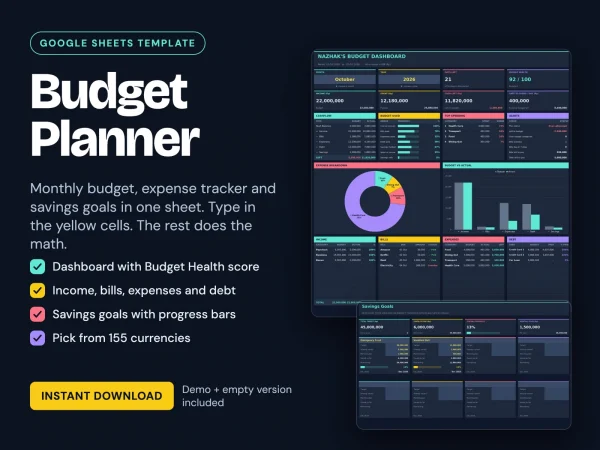
Plan your monthly budget, track every expense, manage bills, and watch your savings goals grow—all in one easy-to-use Google Sheets spreadsheet.
Simply enter your numbers in the yellow cells. Everything else calculates automatically.
WHAT YOU GET
- Demo Version: Pre-filled with sample data so you can explore the features and see how everything works.
- Empty Version: A clean, ready-to-use template with the same tabs, formulas, and automated calculations, ready for your personal finances.
WHAT’S INSIDE (6 TABS)
01. START HERE
Personalize your planner in just a few steps:
- Choose your preferred currency.
- Enter your name and opening balance.
- Set your budget period start day (for example, your payday).
02. DASHBOARD
See your financial overview at a glance.
- Select any month and year.
- Track total income, spending, and remaining cash.
- See your safe-to-spend amount per day.
- Monitor your Budget Health Score (out of 100).
- Get helpful budget alerts.
- Visualize spending with an expense breakdown chart and a Budget vs. Actual chart.
03. BUDGET
Give every dollar a purpose before you spend it.
- Plan your monthly income, bills, expenses, and debt.
- Set individual budget amounts.
- Assign due days to bills and debt payments.
- Automatically see planned income, planned outflow, and monthly surplus.
04. TRANSACTIONS
Keep your daily spending organized.
- Record each transaction with its date, category, amount, and note.
- Select categories using convenient dropdown menus.
- Transaction types populate automatically.
- Includes 500 ready-to-use transaction rows.
05. GOALS
Turn your savings plans into visible progress.
- Track up to 8 savings goals.
- Visual progress bars.
- Monthly savings plans.
- Estimated goal completion dates.
06. HISTORY
Look back and see how far you’ve come.
- View your financial totals across all time.
- Filter your financial history by individual year.
155 CURRENCIES SUPPORTED
Make your budget planner work wherever you are.
Choose from 155 currencies, including IDR, USD, EUR, GBP, SGD, MYR, THB, AUD, JPY, and many more.
Select your currency once in the Start Here tab, and the spreadsheet automatically updates its titles and headers accordingly.
SIMPLE INPUT. AUTOMATIC CALCULATIONS.
No complicated setup. No advanced spreadsheet knowledge needed.
Yellow cells = Your input.
All other calculated cells are protected with a STOP warning if you attempt to overwrite them, helping keep your formulas safe.
Spend less time calculating and more time understanding where your money goes.
HOW TO USE
- Download your files after purchase.
- Upload them to Google Drive and open with Google Sheets.
- Select your currency, enter your name and opening balance.
- Start filling in the yellow cells.
- Let the built-in formulas calculate your financial overview automatically.
GOOD TO KNOW
- A free Google account is required to use Google Sheets.
- Amounts are displayed as whole numbers (without decimals).
- For your preferred number formatting, go to Google Sheets → File → Settings → Locale and select your country.
- This is a digital download. No physical product will be shipped.
- Colors and screen appearance may vary slightly depending on your device.
- This spreadsheet is intended for personal budgeting and planning purposes only. It does not constitute financial advice.
TERMS OF USE
For personal use only.
Please do not resell, share, redistribute, or claim the original template as your own.
Questions? Feel free to send me a message. I’ll be happy to help!
| Language | Indonesia, Inggris |
|---|
You may also like
-
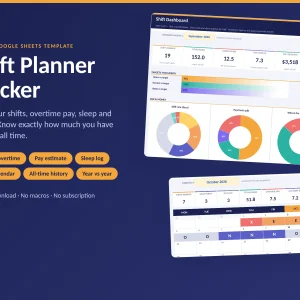
Shift Planner Tracker | Excel & Google Sheets Template for Shift Workers
Original price was: Rp70.000.Rp50.000Current price is: Rp50.000.Select options This product has multiple variants. The options may be chosen on the product page -
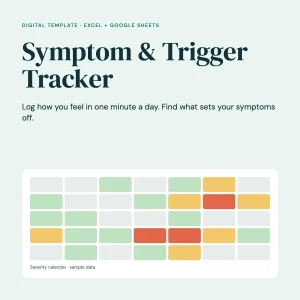
Symptom & Trigger Tracker
Original price was: Rp70.000.Rp50.000Current price is: Rp50.000. -
Weight Loss Tracker Excel Spreadsheet, Calorie Fasting Gym Running Habit Tracker, Body Fat BMI Dashboard, Instant Download
Original price was: Rp70.000.Rp50.000Current price is: Rp50.000.
Reviews
There are no reviews yet.