
The Scholar Planner: Undated Student & Thesis Planner (Hyperlinked PDF)
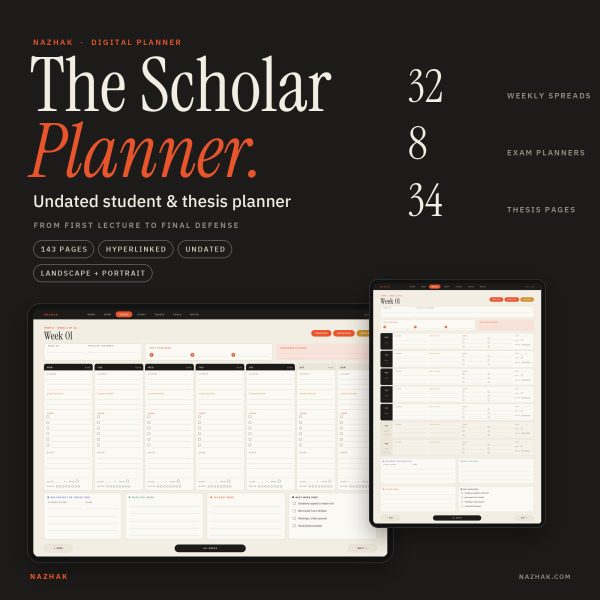
From first lecture to final defense, in one file. A 143-page hyperlinked planner for your tablet that covers your coursework, your exams and your thesis, dissertation or capstone. It is undated, so you can start in any month and reuse it every term.
Most student planners stop at assignments. Most thesis planners ignore your classes. This one keeps both in the same place, so deadlines, study time and writing time stop competing with each other.
What is inside (143 pages)
- Term, 17 pages: setup for 8 courses, weekly timetable, 16-week term map, grade log, deadline master list and a term review. Two terms included.
- Weeks, 33 pages: 32 dense weekly spreads (2 terms x 16 weeks) with Top 3, deadlines, classes, study blocks, tasks, sleep / move / water check, wins, fixes and next-week prep.
- Study, 33 pages: 8 exam planners (topic checklist with three revision passes, past papers, D-14 countdown), 4 spaced recall logs, 4 study session logs, 2 reading logs, 8 Cornell note pages, 4 group project planners and 2 presentation storyboards.
- Thesis, 34 pages: 12-stage roadmap, question canvas, approvals checklist, chapter tracker, 6 chapter planners, 3 literature matrices, 3 source logs, 6 advisor meeting logs, 2 writing sprint trackers (12 weeks each), 3 research logs, 2 revision trackers, defense checklist, Q&A rehearsal, talk outline and submission checklist.
- Tools, 9 pages: goals and why, contacts, 2 applications trackers (internships, scholarships, programs), student money planner (plan vs actual, 12 months), reset menu and year overview.
- Notes, 14 pages: 5 dotted, 5 lined and 3 grid pages.
Why you will like it
- Student and thesis in one planner. Plan the week, study for the exam and move your chapter forward without switching tools.
- Fully hyperlinked. 1,798 internal links: tap any tab to jump to a section, tap a week to open it, and use Prev, hub and Next on every page.
- Undated and reusable. Start in any month, restart after any break, and duplicate pages when you need more.
- Dense, not bloated. 143 pages that cover the whole student journey, instead of hundreds of near-identical days.
- Color has a job. Orange for deadlines and priorities, green for your term, gold for studying, indigo for your thesis.
- Made for handwriting. Write, tick and circle with your stylus. Nothing is auto-calculated, so it stays simple and fast.
Two files included
- Landscape PDF (1194 x 834 pt): wide weekly spreads with seven day columns.
- Portrait PDF (834 x 1194 pt): stacked day rows, easy to hold in one hand.
Both files have the same 143 pages and the same links.
How it works
- Purchase and download your PDF files.
- Import the file into a PDF annotation app on your tablet, such as GoodNotes, Notability, Noteshelf or Xodo.
- Switch to read-only or reading mode to tap links, then switch back to your pen to write.
- Start with Term setup, then the timetable and term map. Plan your first week.
Compatibility
Built for tablet note-taking apps that support internal PDF links. Link behavior depends on your app and platform, so please confirm that your app supports internal PDF hyperlinks before buying. The files open on a computer, but handwriting is much easier with a stylus on a tablet. Not affiliated with any app or brand mentioned.
Good to know
- This is a digital download. No physical item will be shipped.
- The planner is undated and has no calendar widgets or stickers.
- It is a flat hyperlinked PDF, not an editable template. Use your app’s text tool or pen to fill it in.
- For personal use only. Please do not share, resell or redistribute the files.
- Colors may look slightly different on different screens.
Frequently asked questions
Is this for undergraduates or for grad students?
Both. The Term, Weeks and Study sections suit any degree. The Thesis section works for a bachelor’s thesis, master’s thesis, dissertation or capstone project.
Do I need to buy a new planner every year?
No. The planner is undated. Duplicate the pages you need, or buy again only if you want a fresh copy.
Can I use it on an Android tablet or Windows?
It is a standard PDF, so it opens in most PDF apps. Whether the links are tappable depends on the app, so check that your app supports internal PDF links.
Can I print it?
It is designed for tablets, but you can print individual pages for personal use.
Will I get both landscape and portrait?
Yes. Both versions are included in your download.
| Language | Indonesia, Inggris |
|---|
You may also like
-
Shift Work Planner PDF | Undated Digital Planner, Sleep Tracker, Rotating Schedule & Pay Tracker
Original price was: Rp70.000.Rp50.000Current price is: Rp50.000.
Reviews
There are no reviews yet.